限定クーポン配布の方法
URLのルール
<アプリのカスタムURIスキーム名>://jp.popinfo.coupon/coupons/?key=<VALUE>&key2=<VALUE2>
下記は
sampleというカスタムURLスキームを受取り、クーポン一覧画面を表示する場合の例になります。
"sample://jp.popinfo.coupon/coupons/?uuid=xxx&action=distribute"
設定方法
info.plistを開いて、以下のように「URL types」->「URL Schemes」の項目にカスタムURLスキームを設定してください。
URL identifireは端末内でユニークな識別文字列を設定してください。
URL Schemesは複数指定可能です。ここでは、sample://というカスタムURLスキームを想定して設定します。
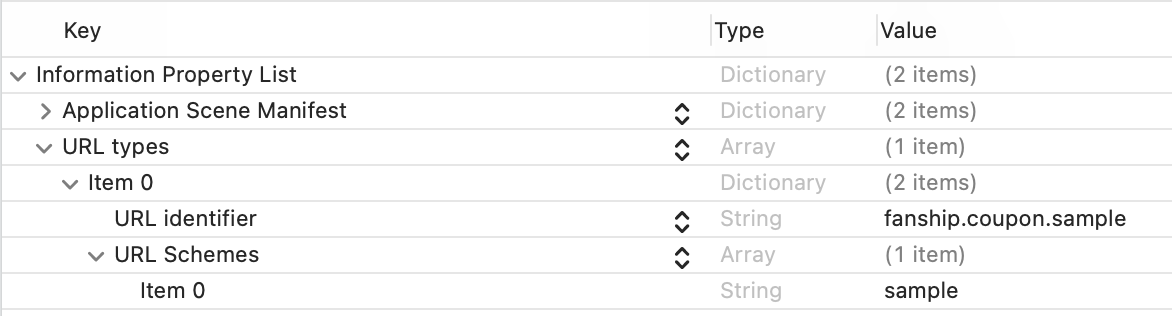
<key>CFBundleURLTypes</key>
<array>
    <dict>
        <key>CFBundleURLName</key>
        <string>fanship.coupon.sample</string>
        <key>CFBundleURLSchemes</key>
        <array>
            <string>sample</string>
        </array>
    </dict>
</array>
実装方法
SceneDelegateを利用する場合
1. カスタムURLスキームを格納する変数を定義
class SceneDelegate: UIResponder, UIWindowSceneDelegate {
    var window: UIWindow?
    var customUrl: URL? // カスタムURLスキームを格納する
    ...
2. アプリが閉じている場合、受取ったカスタムURLスキームを格納
func scene(_ scene: UIScene, willConnectTo session: UISceneSession, options connectionOptions: UIScene.ConnectionOptions) {
    guard let _ = (scene as? UIWindowScene) else { return }

    // アプリが閉じている場合、カスタムURLスキームを確認
    customUrl = connectionOptions.urlContexts.first?.url
}
3. シーンがアクティブ状態になった際に限定クーポンを配布して一覧へ画面遷移
func sceneDidBecomeActive(_ scene: UIScene) {
    ...
    // カスタムURLスキームを確認
    guard let url = customUrl else { return }
    customUrl = nil

    guard let userId = PopinfoReceiver.shared.userId else { return }

    let urlComponents = URLComponents(url: url, resolvingAgainstBaseURL: true)
    // URLからクーポンのuuidを取得
    if let uuid = urlComponents?.queryItems?.first?.value {
        // FanshipCouponClientの初期化
        FanshipCouponClient.sharedInstance().initWithServiceId("your_service_id")
        // 限定クーポンの配布メソッドを呼び出し
        FanshipCouponClient.sharedInstance().distributeCoupon(withUserId: userId, couponUUID: uuid) { response in
            // 限定クーポン配布が成功した場合に、CouponListViewControllerのインスタンスを作成
            let vc = CouponListViewController(serviceId: "your_service_id", userId: userId, uuid: response.coupon?.uuid)

            // UINavigationControllerを利用する場合の画面遷移
            let navigation:UINavigationController = self.window?.rootViewController as! UINavigationController
            navigation.popToRootViewController(animated: false)
            navigation.pushViewController(vc, animated: true)
        } errorHandler: { error in
            // 限定クーポン配布エラー時の処理
        }
    }
}
4. アプリ内で呼ばれた場合に限定クーポンを配布して一覧へ画面遷移
func scene(_ scene: UIScene, openURLContexts URLContexts: Set<UIOpenURLContext>) {
    // カスタムURLスキームを確認
    customUrl = URLContexts.first?.url

    // アプリ内で呼ばれた場合の処理
    if Bundle.main.bundleIdentifier == URLContexts.first?.options.sourceApplication {
        guard let url = customUrl else { return }
        customUrl = nil

        guard let userId = PopinfoReceiver.shared.userId else { return }

        let urlComponents = URLComponents(url: url, resolvingAgainstBaseURL: true)
        // URLからクーポンのuuidを取得
        if let uuid = urlComponents?.queryItems?.first?.value {
            // FanshipCouponClientの初期化
            FanshipCouponClient.sharedInstance().initWithServiceId("your_service_id")
            // 限定クーポンの配布メソッドを呼び出し
            FanshipCouponClient.sharedInstance().distributeCoupon(withUserId: userId, couponUUID: uuid) { response in
                // 限定クーポン配布が成功した場合に、CouponListViewControllerのインスタンスを作成
                let vc = CouponListViewController(serviceId: "your_service_id", userId: userId, uuid: response.coupon?.uuid)

                // UINavigationControllerを利用する場合の画面遷移
                let navigation:UINavigationController = self.window?.rootViewController as! UINavigationController
                navigation.popToRootViewController(animated: false)
                navigation.pushViewController(vc, animated: true)
            } errorHandler: { error in
                // 限定クーポン配布エラー時の処理
            }
        }
    }
}
SceneDelegateを利用しない場合
AppDelegate内のopen urlメソッドで、URLからアプリを起動した時の処理を追加してください。
func application(_ application: UIApplication, open url: URL, sourceApplication: String?, annotation: Any) -> Bool {

    let urlComponents = URLComponents(url: url, resolvingAgainstBaseURL: true)
    // URLからクーポンのuuidを取得
    if let uuid = urlComponents?.queryItems?.first?.value {
        // ユーザーIDは FANSHIP SDK から取得できます
        if let userId = PopinfoReceiver.shared.userId {
            // FanshipCouponClientの初期化
            FanshipCouponClient.sharedInstance().initWithServiceId("your_service_id")
            // 限定クーポンの配布メソッドを呼び出し
            FanshipCouponClient.sharedInstance().distributeCoupon(withUserId: userId, couponUUID: uuid) { response in
                // 限定クーポン配布が成功した場合に、CouponListViewControllerのインスタンスを作成
                let vc = CouponListViewController(serviceId: "your_service_id", userId: userId, uuid: response.coupon?.uuid)

                // UINavigationControllerを利用する場合の画面遷移
                let navigation:UINavigationController = self.window?.rootViewController as! UINavigationController
                navigation.popToRootViewController(animated: false)
                navigation.pushViewController(vc, animated: true)
            } errorHandler: { error in
                // 限定クーポン配布エラー時の処理
            }
        }
    }

    return true
}